Looking for a DataGrip Alternative for PostgreSQL?

DataGrip is a powerful database IDE. PostgresGUI is a lighter native Mac PostgreSQL client for teams that want to browse data and run queries without opening a full IDE.

Common tradeoffs

Why some Postgres users want less IDE

DataGrip is excellent when SQL intelligence, refactoring, many databases, and IDE-style workflows matter. It can be more than you need for quick Mac Postgres work.

Full IDE scope

DataGrip is positioned by JetBrains as a powerful cross-platform IDE for relational and NoSQL databases. That depth is useful, but not every query workflow needs it.[1]

Commercial licensing for work

JetBrains lists DataGrip as free for non-commercial use with paid plans for commercial use. Teams should verify current licensing for their use case.[2]

Project and indexing overhead

IDE-style tools tend to shine in larger environments, but for inspecting a table or running a quick query, that power can feel heavy.

Not a native Mac utility

DataGrip is cross-platform. PostgresGUI is built specifically as a Mac app for PostgreSQL work.

The lightweight alternative

PostgresGUI is for quick, focused Postgres work

Use DataGrip when you need an IDE. Use PostgresGUI when you want a native Mac Postgres client that opens fast and keeps the interface simple.

Fast

Lighter daily workflow

Open the app, connect, browse, query, edit, and export. No project model required for routine Postgres work.

Native

Native macOS feel

PostgresGUI is designed for Mac users who want a desktop client that feels at home on macOS.

Simple

One-time purchase

A small App Store purchase covers the signed build, with source available on GitHub if you prefer to build it yourself.

Private

No telemetry

PostgresGUI does not collect usage data or send your database activity anywhere.
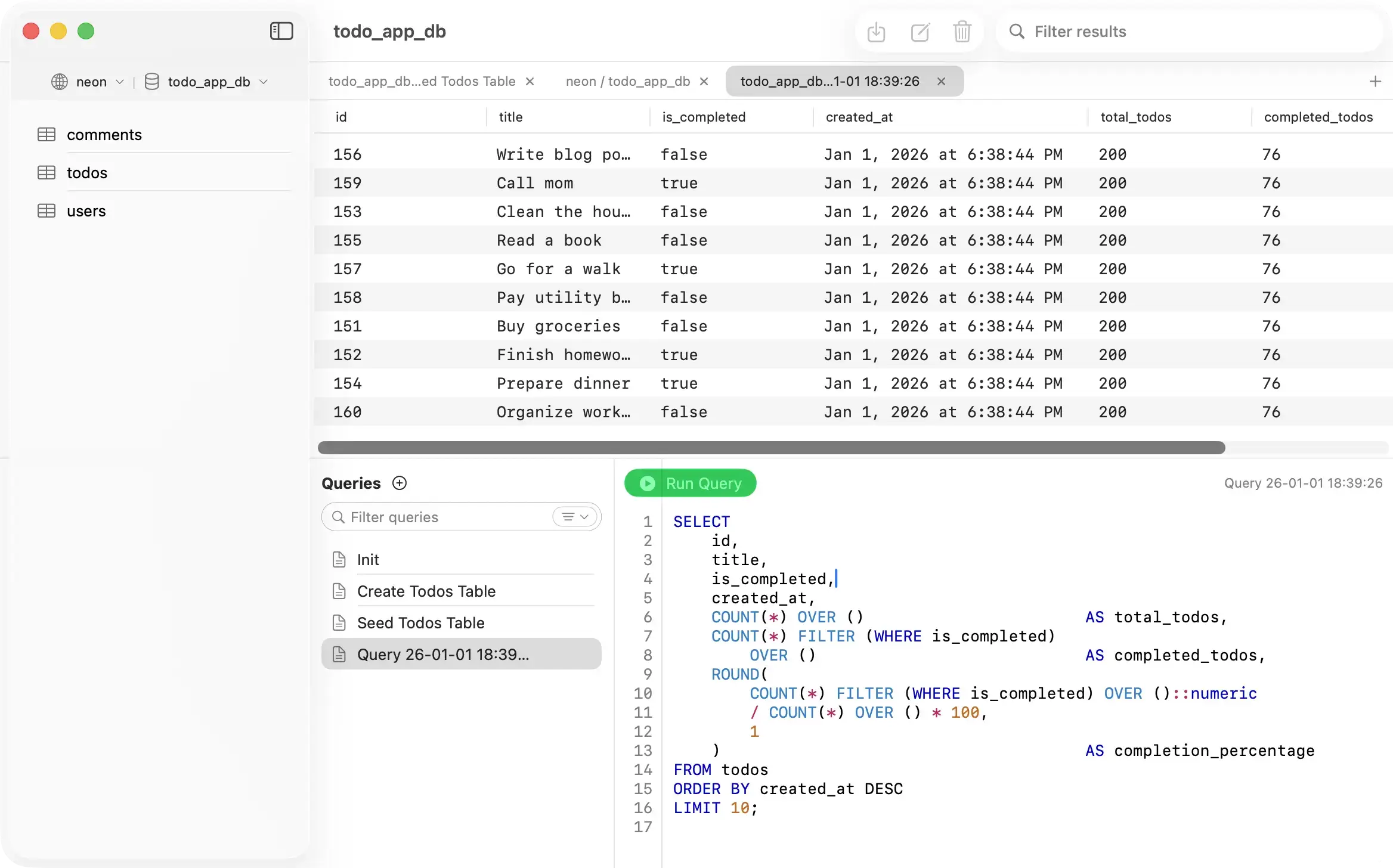
PostgresGUI - Native Mac PostgreSQL client
Side by side

PostgresGUI vs DataGrip

This is a comparison between a focused Mac PostgreSQL client and a full database IDE.

Product type
PostgresGUI
Native Mac Postgres client
DataGrip
Cross-platform database IDE
Database scope
PostgresGUI
PostgreSQL
DataGrip
Relational + NoSQL databases
Best for
PostgresGUI
Browse, query, edit, export
DataGrip
SQL intelligence and IDE workflows
Pricing model
PostgresGUI
$12.99one-time App Store
DataGrip
Free non-commercial + paid plans
Open source
PostgresGUI
DataGrip
Telemetry
PostgresGUI
None
DataGrip
See JetBrains settings
Sources
Last updated: 2026-07-20
Honest assessment

Which tool is right for you?

DataGrip is the stronger IDE. PostgresGUI is the simpler native Mac Postgres client.

PostgresGUI

Choose PostgresGUI if

Recommended
  • You do not need a full SQL IDE for routine PostgreSQL work.
  • You want native macOS feel and a small focused app.
  • You prefer open source and no telemetry.
  • You want a simple one-time App Store purchase for signed builds.
Da

Choose DataGrip if

  • You want advanced SQL completion, refactoring, inspections, and JetBrains IDE integrations.
  • You work with several relational and NoSQL databases.
  • Your team already standardizes on JetBrains tools.

Common questions

Is PostgresGUI a DataGrip replacement?
It replaces DataGrip for common PostgreSQL browsing, query, edit, and export workflows on Mac. It does not try to replace DataGrip's full IDE feature set.
Is DataGrip free?
JetBrains describes DataGrip as free for non-commercial use and offers paid commercial plans. Always check JetBrains for current licensing details.
Why choose PostgresGUI over DataGrip?
Choose PostgresGUI when you want a native, lightweight Mac app for PostgreSQL instead of a full cross-platform database IDE.
Can PostgresGUI work with NoSQL databases?
No. PostgresGUI focuses on PostgreSQL. DataGrip is a better fit if you need relational and NoSQL database support in one IDE.