Looking for a Beekeeper Studio Alternative for Mac?

Beekeeper Studio is a polished cross-platform SQL client. PostgresGUI is the native Mac alternative for developers who want a smaller PostgreSQL-only workflow.

Common tradeoffs

Why Postgres-only Mac users compare alternatives

Beekeeper Studio is modern and approachable, with support for many databases. The question is whether you need cross-platform breadth or a native Mac Postgres client.

Multi-database scope

Beekeeper Studio supports MySQL, PostgreSQL, SQLite, SQL Server, and more. That is great for mixed stacks, but broader than a dedicated Postgres app.[1]

Paid tiers for advanced needs

Beekeeper Studio has a free Community Edition and paid Indie, Professional, and Business plans. Teams should check the current pricing before standardizing.[2]

Cross-platform interface

Cross-platform consistency is useful, but it usually means fewer platform-specific macOS details than a native Swift app can provide.

Not Postgres-only

When PostgreSQL is your only database, multi-engine navigation and messaging can feel less direct than a tool designed around Postgres workflows.

The native Mac path

A smaller Postgres client for macOS

PostgresGUI keeps the scope tight: connect to Postgres, browse tables, run queries, edit rows, view JSON, and export data in a native Mac app.

Mac-first

Swift-native macOS app

PostgresGUI is built specifically for Mac, so it can lean into platform conventions rather than matching every operating system.

Focused

Focused PostgreSQL workflow

No engine switcher, no multi-database positioning, no broad SQL client baggage when your work is Postgres.

Own it

No subscription

The signed Mac App Store version is a one-time purchase, and the source can be built directly from GitHub.

Open

Open source

PostgresGUI is transparent and contributor-friendly, with public source and issue tracking.
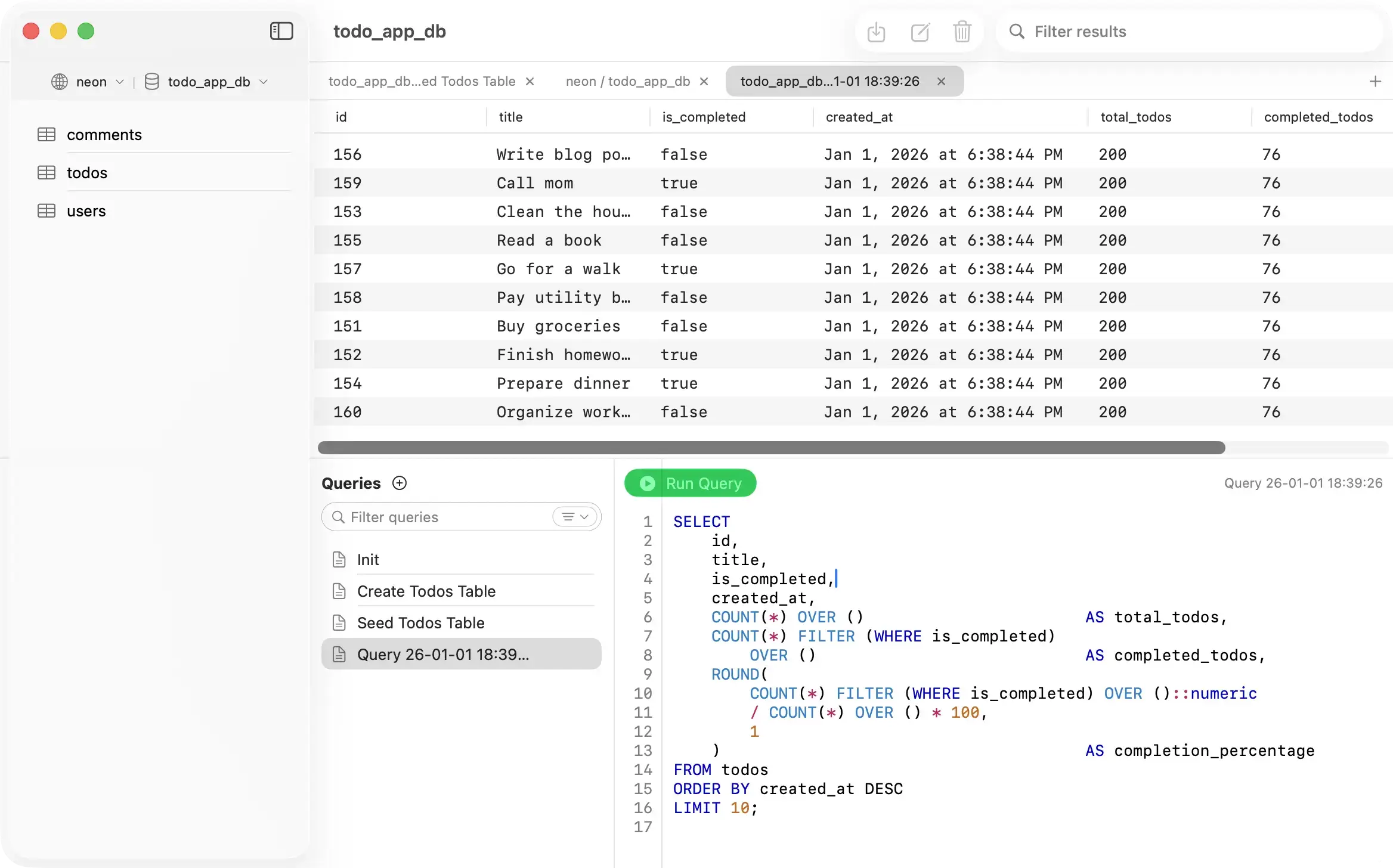
PostgresGUI - Native Mac PostgreSQL client
Side by side

PostgresGUI vs Beekeeper Studio

Both are approachable database clients. The important difference is cross-platform breadth versus native Mac Postgres focus.

Primary focus
PostgresGUI
PostgreSQL on Mac
Beekeeper Studio
SQL client for many engines
Platforms
PostgresGUI
macOS
Beekeeper Studio
Mac, Windows, Linux
Open source
PostgresGUI
Beekeeper Studio
Pricing model
PostgresGUI
$12.99one-time App Store
Beekeeper Studio
Free + paid tiers
Best for
PostgresGUI
Native Mac Postgres work
Beekeeper Studio
Mixed-database workflows
App Store install
PostgresGUI
Beekeeper Studio
Sources
Last updated: 2026-07-20
Honest assessment

Which tool is right for you?

Beekeeper Studio is a strong choice for mixed stacks. PostgresGUI is a better fit when your database work is Postgres on Mac.

PostgresGUI

Choose PostgresGUI if

Recommended
  • You work on macOS and want a native desktop app.
  • You only need PostgreSQL and prefer fewer cross-database concepts.
  • You want a one-time App Store purchase instead of per-user paid tiers.
  • You want a focused table browser, SQL editor, JSON viewer, and CSV export flow.
Be

Choose Beekeeper Studio if

  • You need one SQL client across Mac, Windows, and Linux.
  • You work with MySQL, SQLite, SQL Server, and PostgreSQL side by side.
  • You prefer Beekeeper Studio's community edition or paid team features.

Common questions

Is PostgresGUI a Beekeeper Studio alternative?
Yes, for Mac users whose work is primarily PostgreSQL. PostgresGUI is not a replacement if you rely on Beekeeper Studio for many database engines.
Is Beekeeper Studio open source?
Beekeeper Studio describes itself as open source and offers a free Community Edition, with paid plans for additional professional and business features.
Why choose PostgresGUI instead?
Choose PostgresGUI when native macOS feel, Postgres-only focus, no telemetry, and a one-time App Store purchase matter more than cross-platform database breadth.
Does PostgresGUI have a free version?
The source code can be built for free from GitHub. The signed Mac App Store build is paid once and supports continued development.