Best PostgreSQL GUI clients for Mac in 2026
Ghazi · Updated August 11, 2026
PostgresGUI is the focused native choice, Postico is the mature PostgreSQL-only Mac client, and TablePlus is the native option for several database engines. Use pgAdmin for administration, DBeaver for a free cross-platform workbench, and DataGrip when SQL is part of a larger IDE workflow.
Disclosure: we build PostgresGUI. The comparison below separates its narrower daily-query workflow from features that other clients handle better. Product details are based on each vendor's current documentation; pricing is omitted because it changes more often than the useful differences.
Choose a Mac PostgreSQL client in 30 seconds
| Client | Database scope | Mac experience | Source | Best fit |
|---|---|---|---|---|
| PostgresGUI | PostgreSQL | Native Swift app | Open source | Focused table browsing, SQL, row editing, and exports |
| Postico 2 | PostgreSQL | Native Mac app | Proprietary | A mature PostgreSQL-only data and schema workflow |
| TablePlus | Multiple databases | Native Mac app | Proprietary | One polished client for PostgreSQL and other engines |
| pgAdmin 4 | PostgreSQL | Desktop and web interface | Open source | Administration, roles, maintenance, backup, and restore |
| DBeaver Community | Multiple databases | Cross-platform desktop app | Open source | A broad free workbench used across operating systems |
| DataGrip | Multiple databases | Cross-platform JetBrains IDE | Proprietary | SQL completion, navigation, inspection, and refactoring |
What we compared
A useful client should shorten the work you actually repeat: opening a saved connection, finding a table, running SQL, understanding the result, editing a row, and exporting data. We also considered secure connections, database scope, administration depth, platform fit, and whether the source is available.
This is not a benchmark. We use PostgresGUI directly and checked the other products against their published feature and platform documentation. Download two finalists and try the same real task in both before standardizing a team.
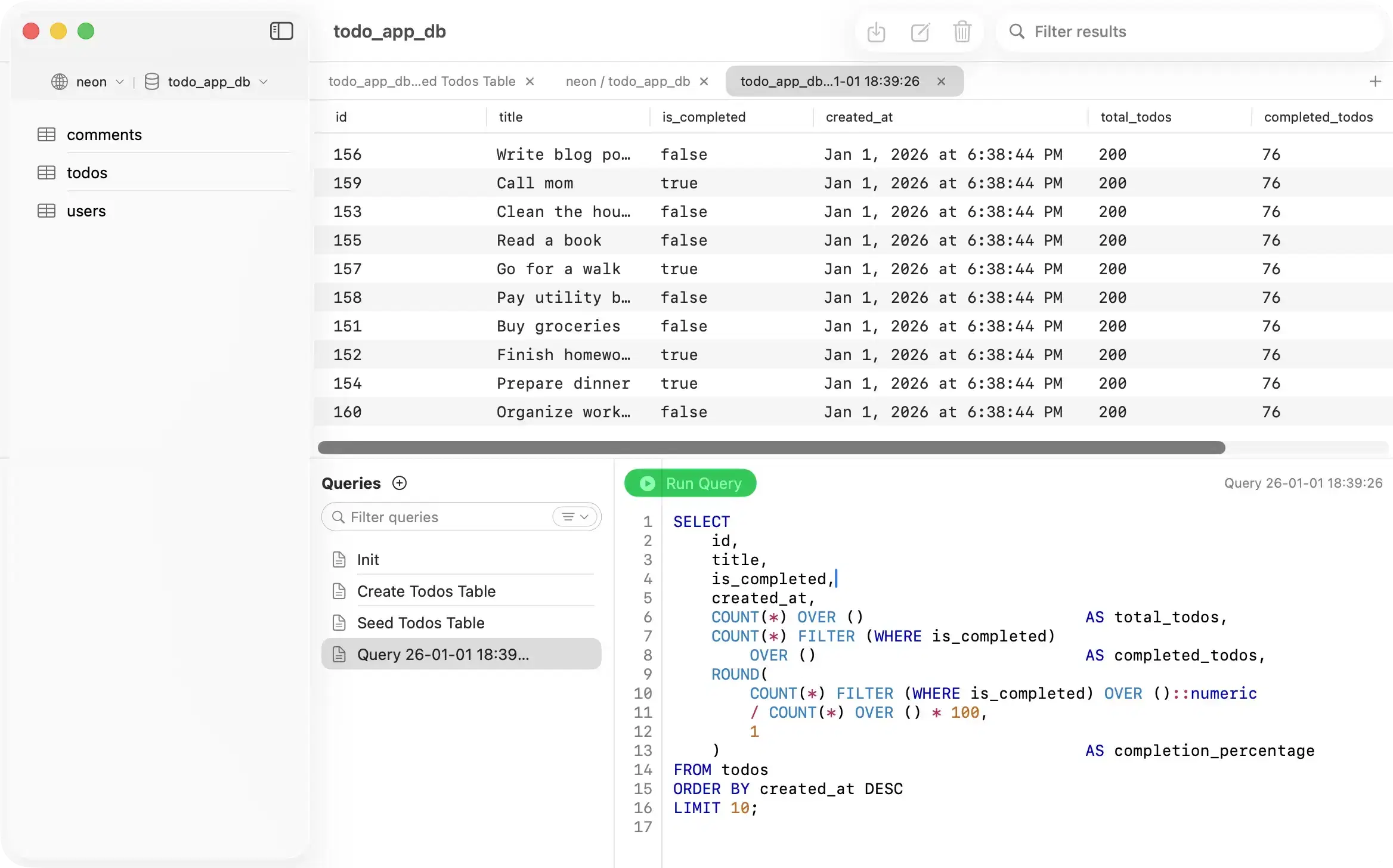
1. PostgresGUI: focused PostgreSQL work
PostgresGUI is a native Swift client built only for PostgreSQL. It covers saved connections, SSL and SSH connections, schema and table browsing, SQL tabs, row editing, JSON results, and CSV export. The source is available under the MIT license.
Choose it when PostgreSQL is the only database you need and you want a small Mac app without a subscription. Choose something else when you need MySQL or SQLite support, visual schema design, or pgAdmin's administration and backup tools. See the complete Mac client workflow or connect it to a local server with the Postgres.app connection guide.
2. Postico 2: mature and PostgreSQL-only
Postico is a native Mac client with a long PostgreSQL product history. Its table content, filtering, editing, favorites, query, and structure views make it a strong choice for people who want a PostgreSQL-specific app with a mature data-entry and schema workflow.
Choose Postico when its schema editing and polished PostgreSQL-only workflow justify a commercial license. Compare its actual daily task flow with PostgresGUI rather than choosing from screenshots alone.
3. TablePlus: native and multi-database
TablePlus supports PostgreSQL alongside MySQL, SQLite, Redis, and other systems in a native Mac client. It is the practical choice when one person moves among several database engines and wants a consistent desktop workflow.
Its broader scope is the advantage. If every connection is PostgreSQL, compare whether those extra engines matter more than a smaller PostgreSQL-only surface. Our TablePlus alternative page covers that narrower decision.
4. pgAdmin 4: PostgreSQL administration
pgAdmin is the strongest option here for administration. It includes object and role management, backup and restore, maintenance, monitoring, schema diff, ERD tools, and a query interface. It is open source and maintained as part of the PostgreSQL community.
Use pgAdmin when the job is operating PostgreSQL rather than mainly browsing application data. For routine querying on a Mac, a smaller desktop client may take fewer steps. See the focused pgAdmin alternatives comparison.
5. DBeaver Community: broad and free
DBeaver Community is an open-source, cross-platform database workbench. It supports many databases and combines SQL editing, data browsing, diagrams, metadata tools, and data transfer. It is a sensible team default when Windows, Linux, and macOS users need a similar interface.
Choose it for breadth and operating-system consistency. The tradeoff is a denser interface than a PostgreSQL-only Mac app.
6. DataGrip: SQL as an IDE
DataGrip is a database IDE from JetBrains. Its strengths are SQL completion, code analysis, navigation, refactoring, database consoles, and integration with the broader JetBrains workflow.
Choose it when writing and maintaining SQL is a substantial part of the job. It is more environment than most people need for occasional table browsing. The PostgreSQL SQL IDE comparison goes deeper on editor-focused choices.
Our recommendation by job
- Native, PostgreSQL-only daily work: try PostgresGUI and Postico with the same database.
- Several database engines on one Mac: start with TablePlus.
- Administration and recovery: use pgAdmin.
- Free cross-platform team standard: use DBeaver Community.
- Deep SQL authoring: use DataGrip.
Run one realistic trial
- Connect with the SSL or SSH path used in production.
- Find a table without knowing its schema.
- Run and save a multi-line query.
- Inspect JSON, NULL, timestamp, and large-text values.
- Edit a row and confirm how changes are reviewed.
- Export a filtered result and reopen it.
- Disconnect, reopen the app, and repeat the task.
If the first connection fails, use the PostgreSQL connection-string error guide before changing credentials or disabling SSL.